About This Game
What Is Minecraft Classic
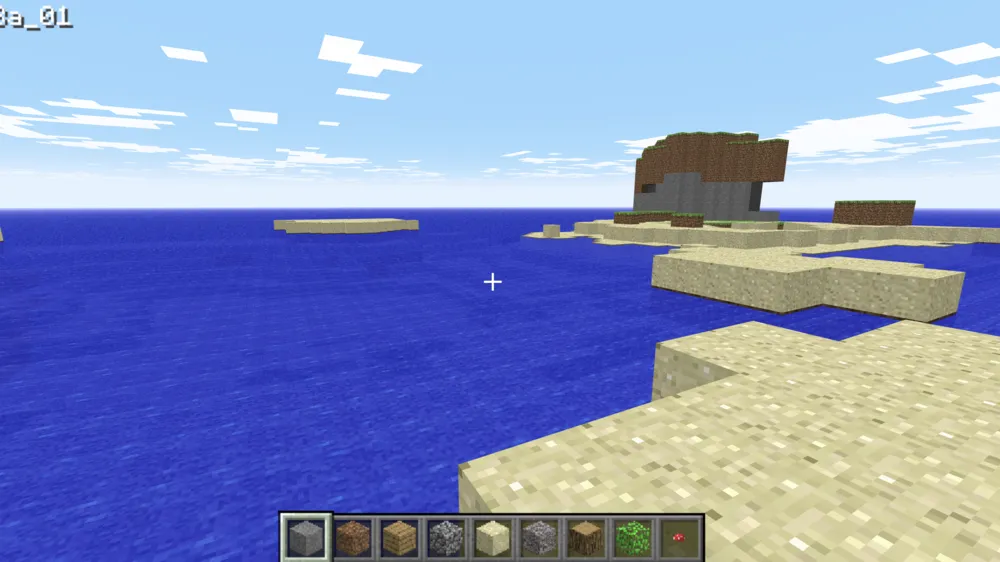
Minecraft Classic is the official browser-based version of Mojang’s iconic voxel sandbox game, released to celebrate Minecraft’s 10th anniversary. It faithfully recreates the original 2009 Early Classic build (version 0.0.23a_01), bringing players back to the game’s historic origins.
Operating entirely within modern web browsers without requiring any downloads, installations, or paid accounts, Minecraft Classic provides pure creative building. You spawn into a retro, randomly generated terrain of blocky landscapes equipped with unlimited building blocks, free from survival pressures, health bars, hunger mechanics, or hostile mobs.
How to Play Minecraft Classic
Getting started with Minecraft Classic is simple, but understanding the controls will help you navigate and build efficiently in your 3D world:
- Movement Controls: Use W, A, S, D to walk around the map, and press Spacebar to jump over single-block obstacles.
- Placing and Breaking Blocks:
- Left-Click to mine or break blocks instantaneously.
- Right-Click to place the selected block.
- Select Block Types: Press B to open the 32-block inventory selector. Use your mouse scroll wheel or number keys (1–9) to quickly cycle through active hotbar blocks.
- Toggle Fog: Press F to switch view distances and render fog density, which helps smooth out performance on lower-end devices.
- Multiplayer Mode: Create a new session, copy the unique web link generated at the top of your screen, and send it to up to 9 friends to build together in real time.
Key Features & Highlights
- Pure 2009 Nostalgia: Features original textures, retro sound effects, vintage user interfaces, and classic building dynamics.
- 32 Classic Block Types: Build with fundamental elements such as dirt, cobblestone, bedrock, wood, saplings, and 16 vibrant wool colors.
- Zero-Download Browser Play: Runs natively via WebGL on modern browsers like Chrome, Firefox, Edge, and Safari with no installation required.
- Instant Multiplayer Support: Host collaborative sandbox sessions effortlessly by sharing a simple URL with friends.
- Unlimited Creative Freedom: No crafting recipes, health meters, or night-time monster attacks—just pure, uninterrupted building.
Tips & Strategies
- Plan Your Architecture First: With 32 basic block types, detail comes from contrast and shape. Outline your base layout on the ground before raising walls.
- Master Quick-Key Block Toggling: Keep your most-used building blocks (like cobblestone, wood planks, and glass) mapped to your 1–9 hotbar slots for fluid construction.
- Use Fog (
F) for Better Frame Rates: If your browser experiences latency or frame drops during massive builds, pressFto lower the render distance. - Coordinate in Multiplayer: When building with friends, assign specific tasks (e.g., land clearing, frame building, interior decoration) to avoid overwriting each other’s work.
- Save Your World: Since classic browser sessions do not save to cloud accounts, save your level locally via the
Escmenu before closing your browser tab.
Frequently Asked Questions (FAQ)
Is Minecraft Classic free to play?
Yes, Minecraft Classic is 100% free to play directly in your web browser. You do not need a Mojang or Microsoft account to start playing.
Can I play Minecraft Classic on mobile devices or tablets?
No, Minecraft Classic requires a physical keyboard and mouse for movement and camera controls. It is designed for desktop and laptop web browsers.
How do I invite friends to my Minecraft Classic world?
Click host/start world, copy the generated browser URL from the top of your screen or host prompt, and send it to your friends. Up to 10 players total can join the same world.
What is the difference between Minecraft Classic and modern Minecraft?
Minecraft Classic only includes the 2009 creative mode with 32 block types. It lacks survival mode, crafting recipes, weapons, armor, mobs (like Creepers), redstone, and modern biomes.
Does Minecraft Classic save my progress automatically?
World progress relies on active browser sessions or local browser data. If all players leave a multiplayer URL or clear their browser cache, the world will reset. Always export or save your level using the Esc menu option if available.