About This Game
What Is Townscaper
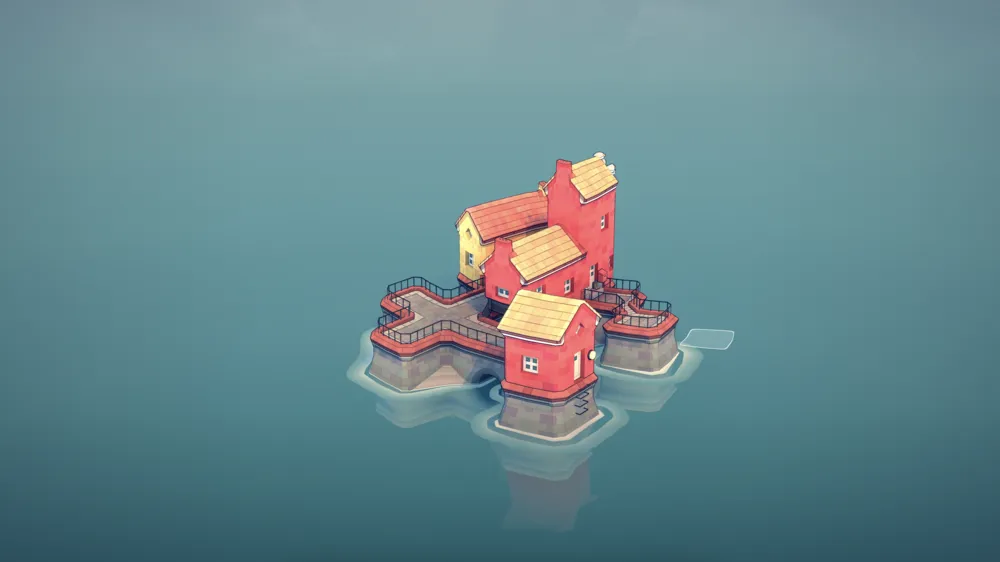
Townscaper is an indie building sandbox developed by Oskar Stålberg that turns city construction into an intuitive, relaxing art form. Instead of managing budgets, traffic, or resource chains like traditional city builders, Townscaper offers an empty ocean canvas and a simple invitation: click anywhere on the water and watch what emerges.
Behind its pastel visual style lies a clever underlying grid system composed of irregular Voronoi cells and geometric loops. When you place a block, context-aware algorithms instantly analyze neighboring tiles to determine whether to create a pier, a balcony, a red-tiled roof, or a stone archway. The result is an effortless architectural sandbox where random clicks transform into quaint Scandinavian-style coastal villages, towering cathedrals, or soaring fantasy sky-cities.
How to Play Townscaper
Playing Townscaper requires no tutorials or complex key bindings. The entire interface centers around picking colors and placing building blocks:
- Place Blocks: Left-click on open water to create wooden stilts or stone foundations. Click on top of existing land or buildings to add height and create multi-story towers.
- Remove Blocks: Right-click (or long-press on touchscreens) on any placed block to delete it instantly. The surrounding architecture dynamically adjusts to fill gaps or convert into arches.
- Select Palette Colors: Pick from a curated palette of vibrant pastel shades on the color bar. Changing colors on adjacent blocks creates striking contrast between building facades.
- Camera Navigation: Click and drag with the right mouse button (or hold middle click) to orbit and pan around your town. Use the scroll wheel to zoom in close to inspect tiny architectural details.
Key Features & Highlights
- Context-Aware Procedural Generation: The engine automatically inserts ladders, stairways, rooftop terraces, clotheslines, and support pillars based on surrounding structures.
- Propeller-Driven Floating Islands: By manipulating enclosed grid loops, players can detach land foundations to construct floating sky havens kept aloft by mechanical propellers.
- Hidden Micro-Details: Watch flocking pigeons gather on rooftops, colorful flag buntings stretch between buildings, and windows light up as you adjust the lighting angle.
- Dynamic Sun & Shadow Lighting: An interactive light control slider lets you adjust the sun’s angle to capture dramatic golden-hour shadows or warm nocturnal glows.
- Zero Pressure Sandbox: No timers, no monetary budgets, no population quotas, and no win/loss conditions—just pure creative expression.
- 3D Export & Code Sharing: Save your towns as light text strings to share across browsers or export them directly as
.obj3D files for rendering and 3D printing.
Tips & Strategies
- Master the Floating Island Trick: To create a sky city without ground stilts, find a circular loop on the underlying grid. Build a solid 2-3 story foundation over the entire loop, then delete the entire bottom layer of blocks. Because the loop grid has no exterior corner nodes for stilts to latch onto, the game automatically generates steam-punk propellers beneath the floating town.
- Spawn Secret Courtyards & Green Gardens: Surround an empty grid area entirely with multi-story building walls (at least two blocks high). The enclosed center space will automatically transform into a lush grassy courtyard.
- Build Functional Lighthouses: Construct a narrow, one-tile-wide tower at least three stories high while alternating between two colors for each layer. The topmost block will transform into a glowing lighthouse lantern.
- Generate Stone Paths & Sculptures: Place 1-block-high wall cutouts inside your courtyard walls to form garden doorways. Align multiple doorways across a courtyard, and the grass will develop stone walking paths and central courtyard statues.
- Use Narrow Gaps for Clotheslines: Leaving a single-tile gap between facing building walls causes clotheslines and party flag strings to automatically stretch between the facades.
Frequently Asked Questions (FAQ)
Is Townscaper free to play in the browser?
Yes! The browser version of Townscaper allows you to build, customize, and export towns directly in your web browser without downloading any software or creating an account.
How do I build floating islands with propellers in Townscaper?
Floating islands require building over a closed circular loop on the grid. Construct a solid foundation across the loop, then delete the ground-level blocks. If the loop lacks right-angle corner attachment points, the procedural algorithm replaces stilts with floating propellers.
Why hasn’t my enclosed courtyard turned into a green garden?
Ensure that the surrounding wall is completely closed with no missing tiles and that the walls are at least two stories tall. If any side is open to the ocean or missing a block, the game treats it as a standard alleyway rather than a garden courtyard.
Can I export my Townscaper builds for 3D modeling or printing?
Yes. In the main menu, you can export your town as a standard .obj file format, complete with texture maps, allowing you to open your town in Blender or 3D print your custom structures.
How do I save and share my town with friends?
Townscaper generates a shareable text code representing your exact town layout. You can copy this string to your clipboard and load it on any device to resume building.