About This Game
What Is Slow Roads
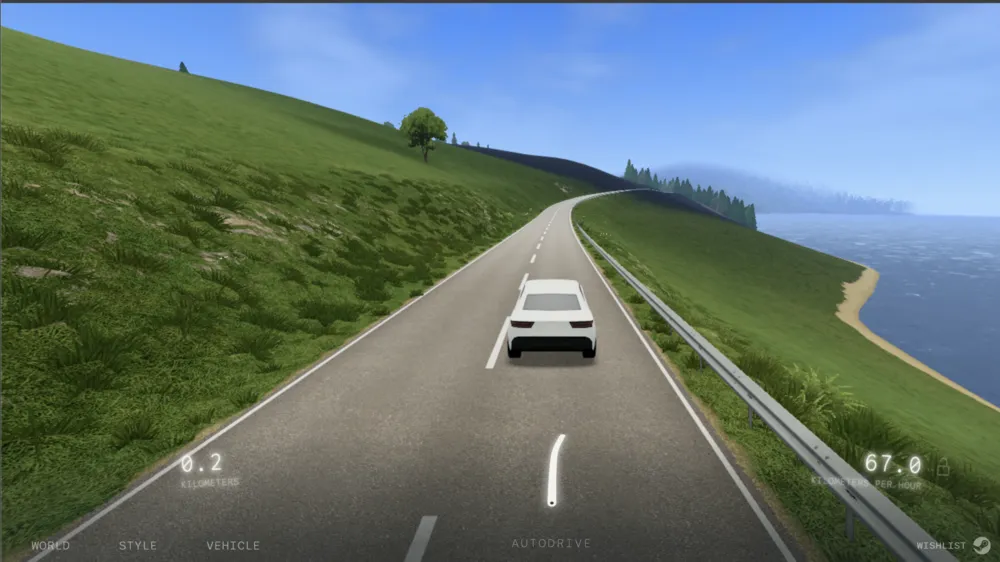
Slow Roads is an atmospheric, endless driving simulator created by independent developer Anslo. Unlike traditional racing games that focus on tight turns, speed traps, lap times, and fierce competition, Slow Roads centers around pure relaxation, mindfulness, and visual serenity. Powered by WebGL right inside your web browser, the game renders procedural 3D terrain that generates infinitely as you drive forward.
Whether you are navigating winding mountain highways, rolling green hills, sunlit coastlines, or quiet forest roads, Slow Roads ensures no two drives are ever identical. There are no timers, no gas limits, no crash penalties, and no high scores to chase. It serves as a digital sanctuary—a meditative experience where you can unwind after a long day, listen to ambient lo-fi soundscapes, or simply enjoy the hypnotic rhythm of an endless road stretching toward the horizon.
How to Play Slow Roads
Playing Slow Roads requires zero setup or download—simply open it in your browser and hit the gas. The vehicle responds to familiar keyboard inputs, offering smooth handling and intuitive control:
- W / Up Arrow: Accelerate forward.
- S / Down Arrow: Brake or reverse.
- A / D or Left / Right Arrows: Steer left and right.
- Left Shift: Boost speed for a faster cruise.
- Spacebar / B: Engage the handbrake (Spacebar for temporary braking, B for toggle).
- F: Toggle Autopilot mode on or off.
- C: Cycle through camera angles (including cockpit view, third-person follow, and hood camera).
- R: Instant vehicle reset back onto the paved path if you drive off-road.
- U: Toggle user interface elements on or off for clean, cinematic screenshots.
- Q / E: Quick-switch weather presets and atmospheric scene lighting.
- Mouse Click + Drag: Rotate camera in free-look mode to admire surrounding vistas.
You can customize your experience at any time using the on-screen settings menu. Adjust steering sensitivity, tweak graphic settings for smoother performance, select your preferred biome, or modify time-of-day parameters like golden hour sunset or tranquil midnight.
Key Features & Highlights
- Infinite Procedural Generation: Advanced algorithms generate continuous, realistic roads and landscapes on the fly, offering endless geometric variation without repeating tracks.
- Built-in Autopilot Mode: Press ‘F’ to hand off driving controls to the AI. Sit back and watch the vehicle navigate curves smoothly while you focus on studying, working, or meditating.
- Diverse Vehicle Roster: Drive nimble sports cars, vintage cruisers, agile motorcycles, or heavy coaches—each featuring distinct handling physics and engine sound profiles.
- Customizable Seasons & Environment Controls: Switch between sunny summers, snowy winters, misty autumn mornings, or starry nights, complete with dynamic weather and atmospheric fog effects.
- Zero-Stress Gameplay: Complete freedom with no lap limits, zero collision damage, no fuel mechanics, and no competitive leaderboards.
- Browser-Native & Lightweight Performance: High-performance 3D rendering with scalable graphics options, optimized to run seamlessly across laptops, desktops, and Chromebooks.
Tips & Strategies
- Use Autopilot as a Lofi Focus Tool: Activate Autopilot (
F) and hide the interface (U) to turn Slow Roads into a hypnotic background video while studying, coding, or listening to music. - Master Camera Angles for Full Immersion: Switch to the first-person cockpit view (
C) when driving through mountain passes for an authentic, immersive road trip sensation. - Fine-Tune Graphics for Smooth Performance: If experiencing frame drops, open the Graphics menu to lower render distance or resolution scaling while keeping atmospheric fog enabled.
- Embrace Off-Road Exploration: Don’t hesitate to steer off the paved highway onto grassy fields or rolling hills. Pressing
Rinstantly snaps your vehicle back to the main track whenever you want to resume cruising. - Customize Keybindings: If default keyboard controls feel rigid, open the Settings menu to map controls to your preferred keys or adjust steering linearity.
Frequently Asked Questions (FAQ)
Is Slow Roads free to play?
Yes, Slow Roads is completely free to play directly in your web browser with no registration, downloads, or hidden fees.
How do I activate Autopilot in Slow Roads?
Simply press the F key while driving to toggle Autopilot mode. The AI driver will automatically steer and control speed, allowing you to enjoy the scenery hands-free.
Can I play Slow Roads with a controller?
Yes! Slow Roads supports gamepad and controller input alongside traditional keyboard and mouse controls. You can map controller buttons in the settings menu.
What vehicles can I drive in Slow Roads?
Slow Roads features multiple vehicle options including classic sedan cars, heavy coaches/buses, and motorcycles, each with unique handling characteristics.
Is Slow Roads available on Steam or offline?
While the original game began as a browser-based project, an expanded desktop version is also available with offline play, enhanced graphics, and expanded vehicle customization.