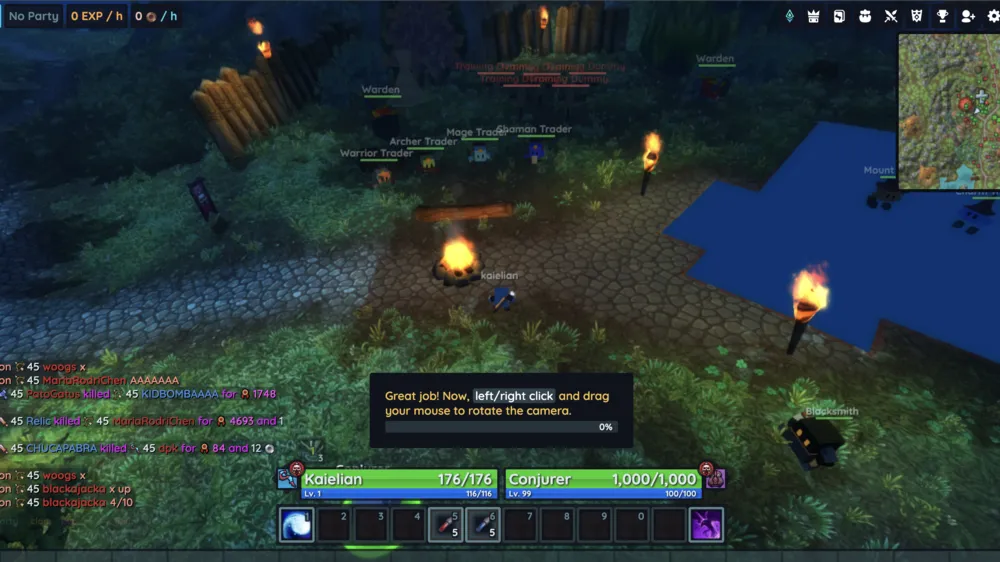
About This Game
What Is Hordes.io
Hordes.io is a popular 3D browser-based MMORPG that delivers a full-fledged online multiplayer RPG experience without needing downloads or installations. Set in a persistent fantasy universe, the game places players right into an ongoing conflict between two rival factions: Vanguard (blue) and Bloodlust (red).
Featuring clean low-poly graphics, fluid real-time combat, and a player-driven economy, Hordes.io combines classic MMORPG progression—grinding mobs, upgrading gear, and teaming up for party play—with instant browser accessibility. Whether you are hunting bosses or clashing in massive open-world PvP battles, Hordes.io offers deep progression right inside your web browser.
How to Play Hordes.io
Getting started in Hordes.io is quick and straightforward:
- Choose a Faction & Class: Pick your permanent side—Vanguard or Bloodlust—and select one of four combat classes:
- Warrior: High-defense frontline tank who protects allies and absorbs heavy damage.
- Mage: Ranged caster specializing in crowd control, freezing spells, and heavy Area-of-Effect (AoE) magic.
- Archer: Ranged physical damage dealer capable of lethal single-target burst damage.
- Shaman: Vital support and healer class that keeps party members alive while applying buffs and debuffs.
- Master the Controls: Move using WASD or arrow keys. Adjust your camera by holding down any mouse button and dragging, and scroll to zoom in or out. Use number keys 1–9 to trigger hotkey skills. Hold Shift to highlight and pick up dropped loot on the ground.
- Grind & Party Up: Hunt monsters matching your level to gain experience points (XP) and loot. Form a party with same-faction players to take down tougher mobs, clear high-density zones, and stay safe from enemy player attacks.
- Upgrade Gear & Trade: Visit the Blacksmith in safe havens to upgrade equipment using runes dropped by monsters, or list items on the global Merchant market.
- Earn PvP Fame: Defeat opposing faction members in open-world combat to earn Fame points and loot gold, but be careful—dying in PvP causes you to lose gold and Fame.
Key Features & Highlights
- Instant 3D Browser Gaming: Powered by WebGL2, Hordes.io runs smoothly in modern desktop browsers with zero installation or plug-ins required.
- Persistent Faction Warfare: Continuous open-world PvP between Vanguard and Bloodlust creates tense, unpredictable player encounters across the world map.
- Classic Holy Trinity Combat: Four well-balanced classes create strategic synergies for dungeon raids, boss fights, and squad combat.
- Deep Equipment & Trading System: Collect randomized gear drops, socket upgrade runes at the Blacksmith, and trade on a player-driven marketplace.
- Clean UI & Ad-Free Gameplay: Enjoy a clean, distraction-free interface built purely for gameplay without intrusive banner ads.
Tips & Strategies
- Never Retreat Walking Backward: Walking backward drastically reduces your movement speed. Strafe sideways while maintaining sight of your target to move at full speed.
- Face Your Attackers: Shield blocks and defensive stats rely on directional positioning. If an enemy attacks your back, your block rate is cut in half.
- Target Support Classes First: In team PvP skirmishes, focus fire on enemy Shamans first to cut off their healing before tackling tanks or damage dealers.
- Always Farm in Groups: Solo players above level 10 are vulnerable to enemy faction ambushes (ganking). Teaming up increases XP speed and survival rates.
- Prioritize Primary Class Stats: Upgrade gear that boosts your core stat (Strength for Warrior, Intelligence for Mage, Dexterity for Archer, Wisdom for Shaman) along with Stamina for max health.
Frequently Asked Questions (FAQ)
Is Hordes.io completely free to play?
Yes. Hordes.io is entirely free to play in modern desktop web browsers. You can play as a guest or log in with Google to save your character progress across sessions.
Why is Hordes.io showing a black screen or failing to load?
A black screen usually indicates WebGL2 is disabled or unsupported in your browser. Use an updated version of Chrome, Firefox, or Edge, and ensure Hardware Acceleration is turned on in your browser settings.
Can I switch my faction after creating a character?
No. Your faction choice (Vanguard or Bloodlust) is permanent for that specific character. If you want to join the opposing faction, you will need to create a new character.
How does gear upgrading work in Hordes.io?
You can upgrade your weapons and armor by obtaining runes from mob drops and bringing them to the Blacksmith in town to enhance item stats.
Does Hordes.io support mobile devices?
While Hordes.io provides touch controls for mobile browsers, the game is optimized for desktop browsers with keyboard and mouse controls for precise PvP movement and skill execution.