About This Game
What Is HexGL
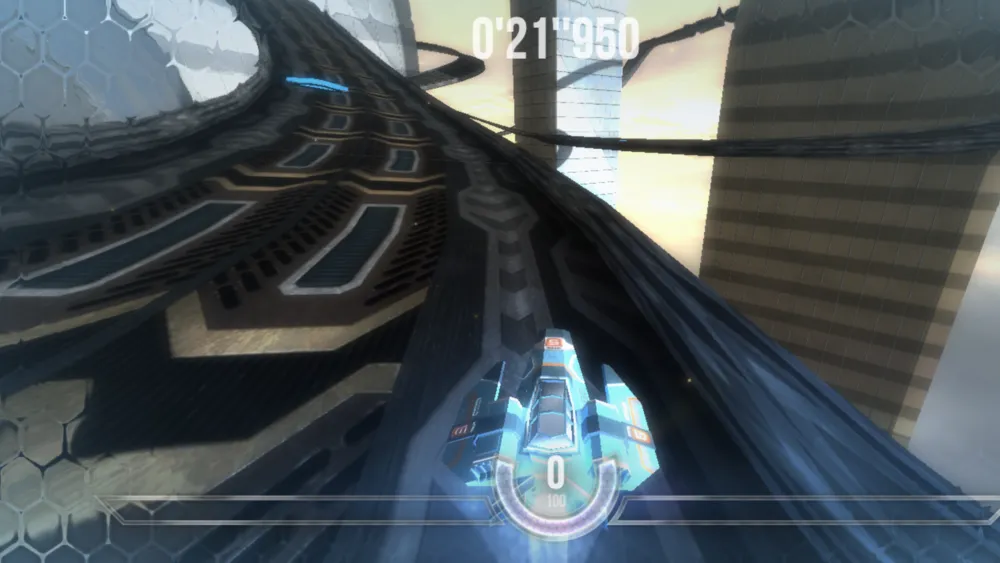
HexGL is a fast-paced, open-source 3D anti-gravity racing game built entirely using HTML5, JavaScript, and WebGL. Created by developer Thibaut Despoulain (BKcore) as a technical showcase and tribute to legendary futuristic racers like Wipeout and F-Zero, HexGL brings high-speed console-style racing directly to modern web browsers without requiring any plugins or downloads.
In HexGL, players control a sleek hovercraft gliding above neon-lit futuristic tracks at extreme velocities exceeding 1,000 km/h. The primary goal is to complete three intense laps in the shortest time possible while navigating sharp hairpin turns, triggering speed boost strips, and avoiding wall collisions that drain ship health and ruin lap records.
How to Play HexGL
HexGL challenges your reaction speed and trajectory control. Hovercrafts float without tire traction, causing them to drift outward on sharp turns, which requires careful steering and airbrake management.
Game Controls
- Accelerate: Press Up Arrow or W to accelerate down straightaways.
- Steer Left / Right: Press Left / Right Arrows or A / D to turn the hovercraft.
- Brake / Slow Down: Press Down Arrow, S, or Spacebar to reduce speed before tight bends.
- Airbrakes: Use A / D (or Q / E depending on key bindings) for left/right airbrakes to perform sharp drift turns without losing core momentum.
Core Gameplay Flow
- Launch & Focus: Click inside the game window once loaded so the browser captures your keyboard controls.
- Master the Launch: Accelerate immediately when the countdown finishes to get up to top speed on the main straight.
- Execute Clean Lines: Anticipate turns early. Use a combination of airbrakes and subtle steering to ride the inside apex of curves.
- Hit Boost Pads: Line up your hovercraft with glowing green speed pads embedded in the track for instant velocity boosts.
- Protect Your Ship: Scraping barriers damages your energy shield. If shield health hits zero, your hovercraft disintegrates.
- Set Lap Records: Complete 3 clean laps to achieve your best time-trial score.
Key Features & Highlights
- Browser 3D Graphics: Leverages Three.js WebGL rendering for dynamic lighting, bloom visual effects, and high framerates inside standard browsers.
- Wipeout-Inspired Mechanics: Features realistic anti-gravity floating physics, airbrakes, speed pads, and shield management mechanics.
- Multiple Quality Profiles: Includes customizable graphics presets (Mobile, Mainstream, Ultra) to ensure smooth performance across low-end and high-end hardware.
- Practice GodMode: Features a built-in GodMode toggle in the setup menu that disables damage, allowing new players to memorize tracks safely.
- 100% Free & Open-Source: Developed under the MIT license with no paywalls, downloads, or sign-ups required.
Tips & Strategies
- Master the Airbrakes: Standard steering often causes hovercrafts to drift into outer walls during tight hairpins. Tap the left or right airbrake (
A/DorQ/E) to pivot the nose of your craft sharply into the turn apex. - Avoid Barrier Contact at All Costs: Wall scraping bleeds speed rapidly and drains energy shields. A slightly lower entry speed with a clean line is always faster than crashing through a turn at max speed.
- Memorize Boost Pad Locations: Track layouts feature strategic speed pads. Map out your racing line across multiple laps to hit every boost pad cleanly.
- Enable GPU Hardware Acceleration: Ensure WebGL hardware acceleration is enabled in your browser settings to maintain a stable 60 FPS frame rate.
- Practice with GodMode First: Toggle GodMode on in the main menu to learn tight braking points and track geometry without blowing up your ship.
Frequently Asked Questions (FAQ)
Is HexGL free to play?
Yes, HexGL is completely free and open-source under the MIT license. You can play the full game in your browser without paywalls or account creation.
How do airbrakes work in HexGL?
Airbrakes allow your hovercraft to pivot quickly during sharp turns. Pressing the left or right airbrake key causes your craft to slide around tight corners without completely sacrificing forward momentum.
Why are my keyboard inputs not working?
Browsers require active canvas focus to capture keyboard inputs. Click once anywhere inside the game frame after loading to activate controls.
Can I play HexGL on mobile or with a controller?
Yes, HexGL includes touch controls for mobile devices and gamepad support, though desktop keyboards and gamepads offer the highest steering precision.
How can I fix performance lag or frame drops in HexGL?
Ensure hardware acceleration is enabled in your browser settings. You can also drop the graphic preset from ‘Ultra’ to ‘Mainstream’ or ‘Mobile’ in the launcher menu.
What does GodMode do in HexGL?
GodMode is an official practice feature that disables collision damage. Turning GodMode on lets you practice track layouts and cornering techniques without risking ship destruction.