WebGL Fluid Simulation
Play WebGL Fluid Simulation online — touch or click to create colorful, swirling liquid dynamics. A relaxing interactive visual sandbox.
About This Game
What Is WebGL Fluid Simulation
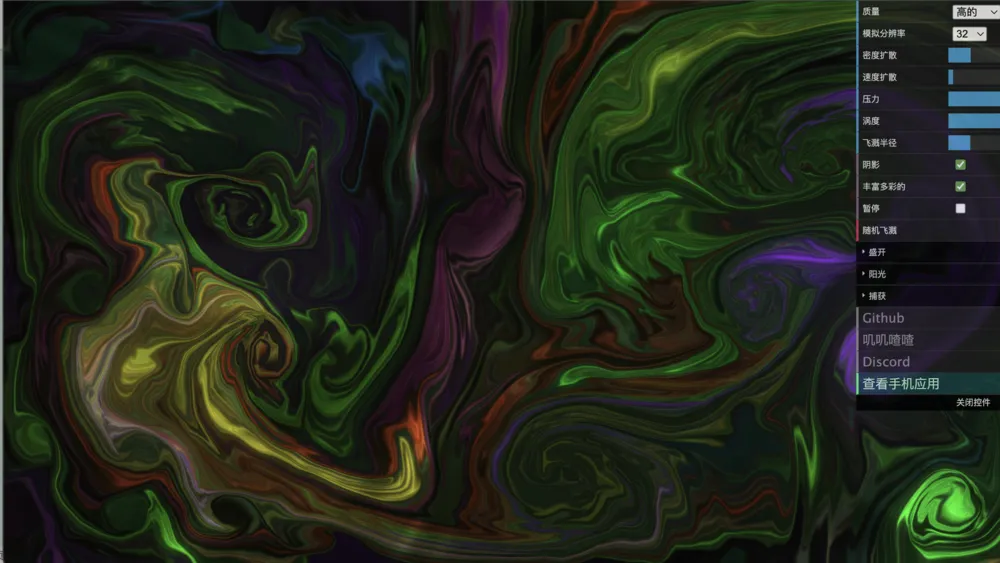
WebGL Fluid Simulation is a relaxing, interactive visual sandbox that turns your browser into a canvas of flowing color. Every touch, click, or cursor movement in WebGL Fluid Simulation injects energy into a virtual liquid, sending vibrant streams of color curling and blending across the screen. There are no goals, no scores, and no enemies — WebGL Fluid Simulation is pure sensory play.
The simulation runs entirely on your GPU through WebGL, which allows WebGL Fluid Simulation to render complex fluid dynamics at smooth frame rates directly in the browser. The result is a visually stunning experience that responds to your input in real time.
How to Interact With WebGL Fluid Simulation
Using WebGL Fluid Simulation is completely intuitive. Click or tap anywhere on the screen and drag to inject a stream of color into the fluid. Moving quickly creates long sweeping trails; small, circular motions in WebGL Fluid Simulation build tight vortices that keep spinning long after you lift your finger.
The settings panel in WebGL Fluid Simulation lets you adjust parameters like curl intensity, pressure, diffusion rate, and color vibrancy. Experimenting with these sliders changes the character of the fluid dramatically — from slow, oily ribbons to explosive bursts that fill the screen in seconds.
Why WebGL Fluid Simulation Is Worth Exploring
WebGL Fluid Simulation is genuinely hard to put down, not because it challenges you but because the results are always beautiful. Each session of WebGL Fluid Simulation looks different, and the interplay between colors mixing in real-time fluid physics creates patterns that feel alive and organic.
It also serves as a surprisingly effective stress-relief tool. The gentle movement of colors in WebGL Fluid Simulation, combined with the satisfying feedback of every gesture, creates a meditative quality that few browser experiences match. Many people keep a WebGL Fluid Simulation tab open specifically to unwind between tasks.
Ideas for Getting the Most Out of WebGL Fluid Simulation
- Try using slow, deliberate spirals in WebGL Fluid Simulation to build layered color vortices before adding a fast swipe through them.
- Switch to a single-color palette in the WebGL Fluid Simulation settings for a more minimalist, ink-like effect.
- Use multiple fingers on touch screens to run parallel streams through WebGL Fluid Simulation simultaneously.
- Max out the curl setting in WebGL Fluid Simulation to see colors spin and twist into complex fractal-like formations.
- Let WebGL Fluid Simulation run without input for a moment; the fluid naturally settles into slow, meditative drifts.
FAQ About WebGL Fluid Simulation
Is WebGL Fluid Simulation a game?
WebGL Fluid Simulation is more of an interactive art experience than a traditional game. There are no rules or objectives.
Does WebGL Fluid Simulation require a powerful computer?
WebGL Fluid Simulation uses GPU acceleration and runs smoothly on most modern devices, though very old hardware may struggle.
Can I change the colors in WebGL Fluid Simulation?
Yes. The settings panel in WebGL Fluid Simulation includes controls for color behavior, including options for rainbow mode and single-hue palettes.
Does WebGL Fluid Simulation work on mobile?
Yes. WebGL Fluid Simulation works beautifully on touch screens, where multi-finger input creates especially dynamic effects.